Apache Druid
  • Technology
  • Use Cases
  • Powered By
  • Docs
  • Community
  • Apache
  • Download

›Tutorials

Getting started

  • Introduction to Apache Druid
  • Quickstart (local)
  • Single server deployment
  • Clustered deployment

Tutorials

  • Load files using SQL
  • Load from Apache Kafka
  • Load from Apache Hadoop
  • Query data
  • Aggregate data with rollup
  • Theta sketches
  • Configure data retention
  • Update existing data
  • Compact segments
  • Deleting data
  • Write an ingestion spec
  • Transform input data
  • Convert ingestion spec to SQL
  • Run with Docker
  • Kerberized HDFS deep storage
  • Get to know Query view
  • Unnesting arrays
  • Query from deep storage
  • Jupyter Notebook tutorials
  • Docker for tutorials
  • JDBC connector

Design

  • Design
  • Segments
  • Processes and servers
  • Deep storage
  • Metadata storage
  • ZooKeeper

Ingestion

  • Overview
  • Ingestion concepts

    • Source input formats
    • Input sources
    • Schema model
    • Rollup
    • Partitioning
    • Task reference

    SQL-based batch

    • SQL-based ingestion
    • Key concepts
    • Security
    • Examples
    • Reference
    • Known issues

    Streaming

    • Apache Kafka ingestion
    • Apache Kafka supervisor
    • Apache Kafka operations
    • Amazon Kinesis

    Classic batch

    • JSON-based batch
    • Hadoop-based
  • Ingestion spec reference
  • Schema design tips
  • Troubleshooting FAQ

Data management

  • Overview
  • Data updates
  • Data deletion
  • Schema changes
  • Compaction
  • Automatic compaction

Querying

    Druid SQL

    • Overview and syntax
    • Query from deep storage
    • SQL data types
    • Operators
    • Scalar functions
    • Aggregation functions
    • Array functions
    • Multi-value string functions
    • JSON functions
    • All functions
    • SQL query context
    • SQL metadata tables
    • SQL query translation
  • Native queries
  • Query execution
  • Troubleshooting
  • Concepts

    • Datasources
    • Joins
    • Lookups
    • Multi-value dimensions
    • Nested columns
    • Multitenancy
    • Query caching
    • Using query caching
    • Query context

    Native query types

    • Timeseries
    • TopN
    • GroupBy
    • Scan
    • Search
    • TimeBoundary
    • SegmentMetadata
    • DatasourceMetadata

    Native query components

    • Filters
    • Granularities
    • Dimensions
    • Aggregations
    • Post-aggregations
    • Expressions
    • Having filters (groupBy)
    • Sorting and limiting (groupBy)
    • Sorting (topN)
    • String comparators
    • Virtual columns
    • Spatial filters

API reference

  • Overview
  • HTTP APIs

    • Druid SQL
    • SQL-based ingestion
    • JSON querying
    • Tasks
    • Supervisors
    • Retention rules
    • Data management
    • Automatic compaction
    • Lookups
    • Service status
    • Dynamic configuration
    • Legacy metadata

    Java APIs

    • SQL JDBC driver

Configuration

  • Configuration reference
  • Extensions
  • Logging

Operations

  • Web console
  • Java runtime
  • Durable storage
  • Security

    • Security overview
    • User authentication and authorization
    • LDAP auth
    • Password providers
    • Dynamic Config Providers
    • TLS support

    Performance tuning

    • Basic cluster tuning
    • Segment size optimization
    • Mixed workloads
    • HTTP compression
    • Automated metadata cleanup

    Monitoring

    • Request logging
    • Metrics
    • Alerts
  • High availability
  • Rolling updates
  • Using rules to drop and retain data
  • Migrate from firehose
  • Working with different versions of Apache Hadoop
  • Misc

    • dump-segment tool
    • reset-cluster tool
    • insert-segment-to-db tool
    • pull-deps tool
    • Deep storage migration
    • Export Metadata Tool
    • Metadata Migration
    • Content for build.sbt

Development

  • Developing on Druid
  • Creating extensions
  • JavaScript functionality
  • Build from source
  • Versioning
  • Contribute to Druid docs
  • Experimental features

Misc

  • Papers

Hidden

  • Apache Druid vs Elasticsearch
  • Apache Druid vs. Key/Value Stores (HBase/Cassandra/OpenTSDB)
  • Apache Druid vs Kudu
  • Apache Druid vs Redshift
  • Apache Druid vs Spark
  • Apache Druid vs SQL-on-Hadoop
  • Authentication and Authorization
  • Broker
  • Coordinator Process
  • Historical Process
  • Indexer Process
  • Indexing Service
  • MiddleManager Process
  • Overlord Process
  • Router Process
  • Peons
  • Approximate Histogram aggregators
  • Apache Avro
  • Microsoft Azure
  • Bloom Filter
  • DataSketches extension
  • DataSketches HLL Sketch module
  • DataSketches Quantiles Sketch module
  • DataSketches Theta Sketch module
  • DataSketches Tuple Sketch module
  • Basic Security
  • Kerberos
  • Cached Lookup Module
  • Apache Ranger Security
  • Google Cloud Storage
  • HDFS
  • Apache Kafka Lookups
  • Globally Cached Lookups
  • MySQL Metadata Store
  • ORC Extension
  • Druid pac4j based Security extension
  • Apache Parquet Extension
  • PostgreSQL Metadata Store
  • Protobuf
  • S3-compatible
  • Simple SSLContext Provider Module
  • Stats aggregator
  • Test Stats Aggregators
  • Druid AWS RDS Module
  • Kubernetes
  • Ambari Metrics Emitter
  • Apache Cassandra
  • Rackspace Cloud Files
  • DistinctCount Aggregator
  • Graphite Emitter
  • InfluxDB Line Protocol Parser
  • InfluxDB Emitter
  • Kafka Emitter
  • Materialized View
  • Moment Sketches for Approximate Quantiles module
  • Moving Average Query
  • OpenTSDB Emitter
  • Druid Redis Cache
  • Microsoft SQLServer
  • StatsD Emitter
  • T-Digest Quantiles Sketch module
  • Thrift
  • Timestamp Min/Max aggregators
  • GCE Extensions
  • Aliyun OSS
  • Prometheus Emitter
  • Firehose (deprecated)
  • JSON-based batch (simple)
  • Realtime Process
  • kubernetes
  • Cardinality/HyperUnique aggregators
  • Select
  • Load files natively
Edit

Query data

This tutorial demonstrates how to query data in Apache Druid using SQL.

It assumes that you've completed the Quickstart or one of the following tutorials, since we'll query datasources that you would have created by following one of them:

  • Load a file
  • Load stream data from Kafka
  • Load a file using Hadoop

There are various ways to run Druid SQL queries: from the web console, using a command line utility and by posting the query by HTTP. We'll look at each of these.

Query SQL from the web console

The web console includes a view that makes it easier to build and test queries, and view their results.

  1. Start up the Druid cluster, if it's not already running, and open the web console in your web browser.

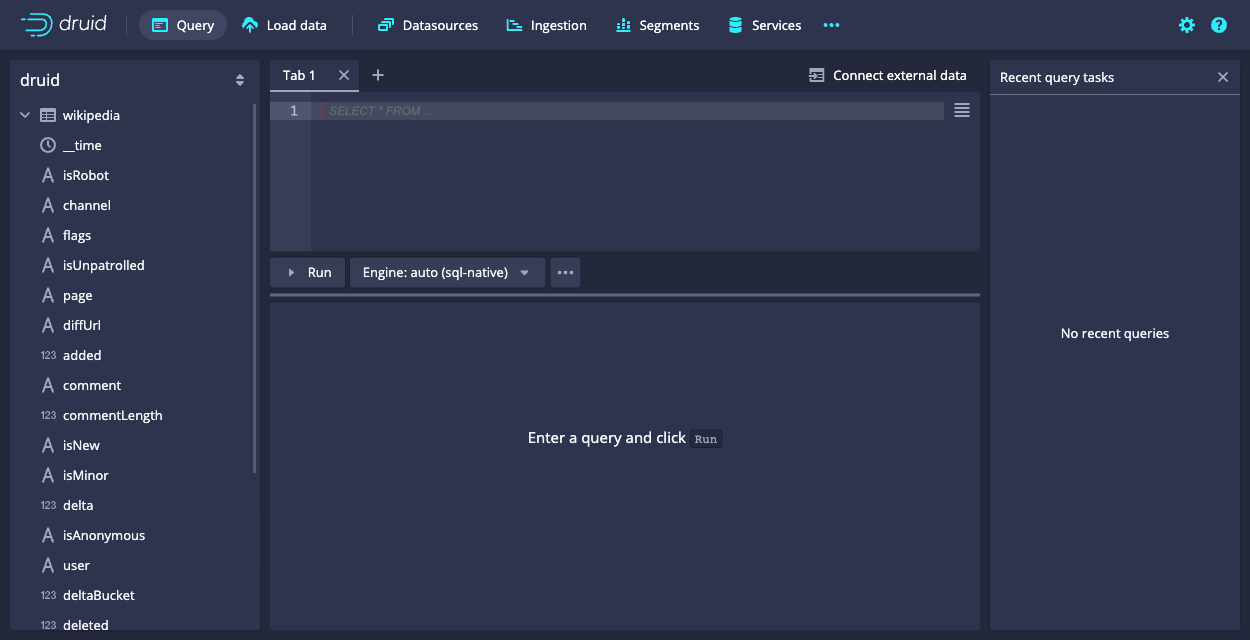
  2. Click Query from the header to open the Query view:
    Query view

    You can always write queries directly in the edit pane, but the Query view also provides facilities to help you construct SQL queries, which we will use to generate a starter query.

  3. Expand the wikipedia datasource tree in the left pane. We'll create a query for the page dimension.

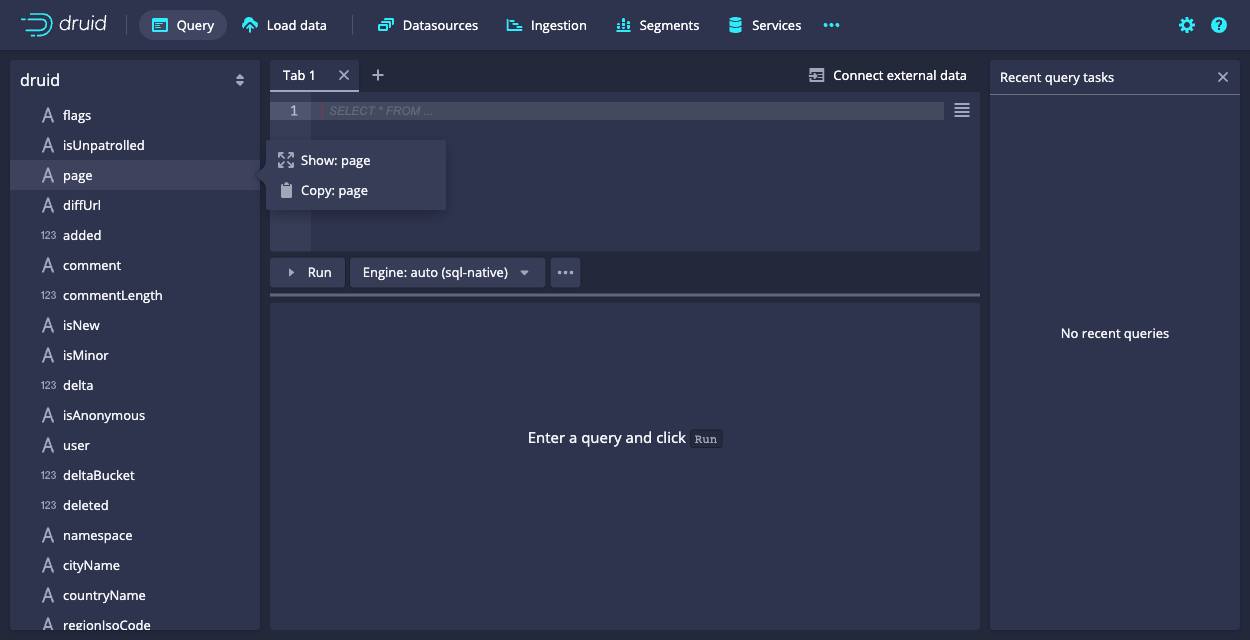
  4. Click page and then Show:page from the menu:

    Query select page

    A SELECT query appears in the query edit pane and immediately runs. However, in this case, the query returns no data, since by default the query filters for data from the last day, while our data is considerably older than that. Let's remove the filter.

  5. Click Run to run the query.

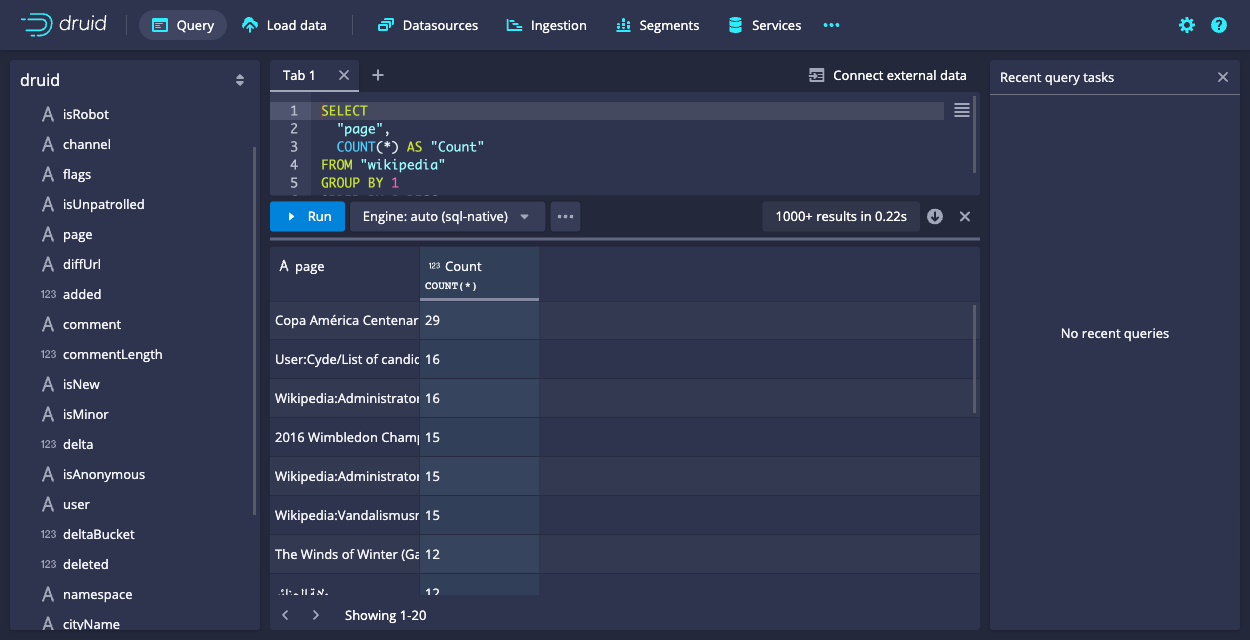
    You should now see two columns of data, a page name and the count:
    Query results

    Notice that the results are limited in the console to about a hundred, by default, due to the Smart query limit feature. This helps users avoid inadvertently running queries that return an excessive amount of data, possibly overwhelming their system.

  6. Let's edit the query directly and take a look at a few more query building features in the editor. Click in the query edit pane and make the following changes:

    1. Add a line after the first column, "page" and Start typing the name of a new column, "countryName". Notice that the autocomplete menu suggests column names, functions, keywords, and more. Choose "countryName" and add the new column to the GROUP BY clause as well, either by name or by reference to its position, 2.

    2. For readability, replace Count column name with Edits, since the COUNT() function actually returns the number of edits for the page. Make the same column name change in the ORDER BY clause as well.

      The COUNT() function is one of many functions available for use in Druid SQL queries. You can mouse over a function name in the autocomplete menu to see a brief description of a function. Also, you can find more information in the Druid documentation; for example, the COUNT() function is documented in Aggregation functions.

    The query should now be:

    SELECT
      "page",
      "countryName",
      COUNT(*) AS "Edits"
    FROM "wikipedia"
    GROUP BY 1, 2
    ORDER BY "Edits" DESC
    

    When you run the query again, notice that we're getting the new dimension,countryName, but for most of the rows, its value is null. Let's show only rows with a countryName value.

  7. Click the countryName dimension in the left pane and choose the first filtering option. It's not exactly what we want, but we'll edit it by hand. The new WHERE clause should appear in your query.

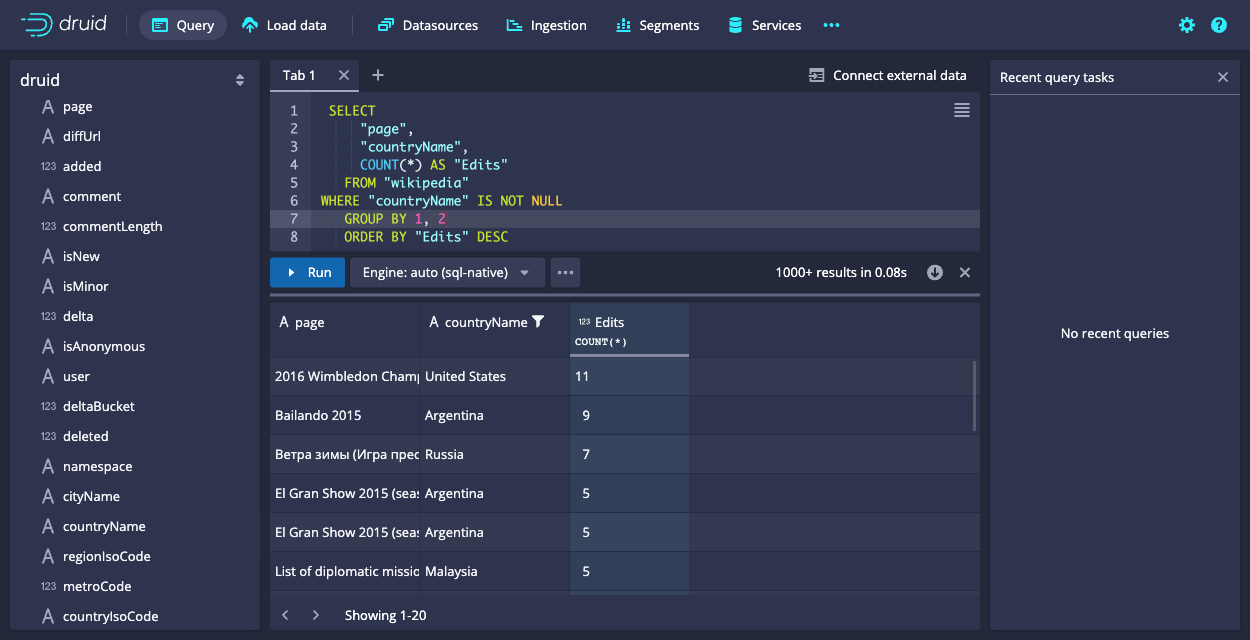
  8. Modify the WHERE clause to exclude results that do not have a value for countryName:

    WHERE "countryName" IS NOT NULL
    

    Run the query again. You should now see the top edits by country:
    Finished query

  9. Under the covers, every Druid SQL query is translated into a query in the JSON-based Druid native query format before it runs on data nodes. You can view the native query for this query by clicking ... and Explain SQL Query.

    While you can use Druid SQL for most purposes, familiarity with native query is useful for composing complex queries and for troubleshooting performance issues. For more information, see Native queries.
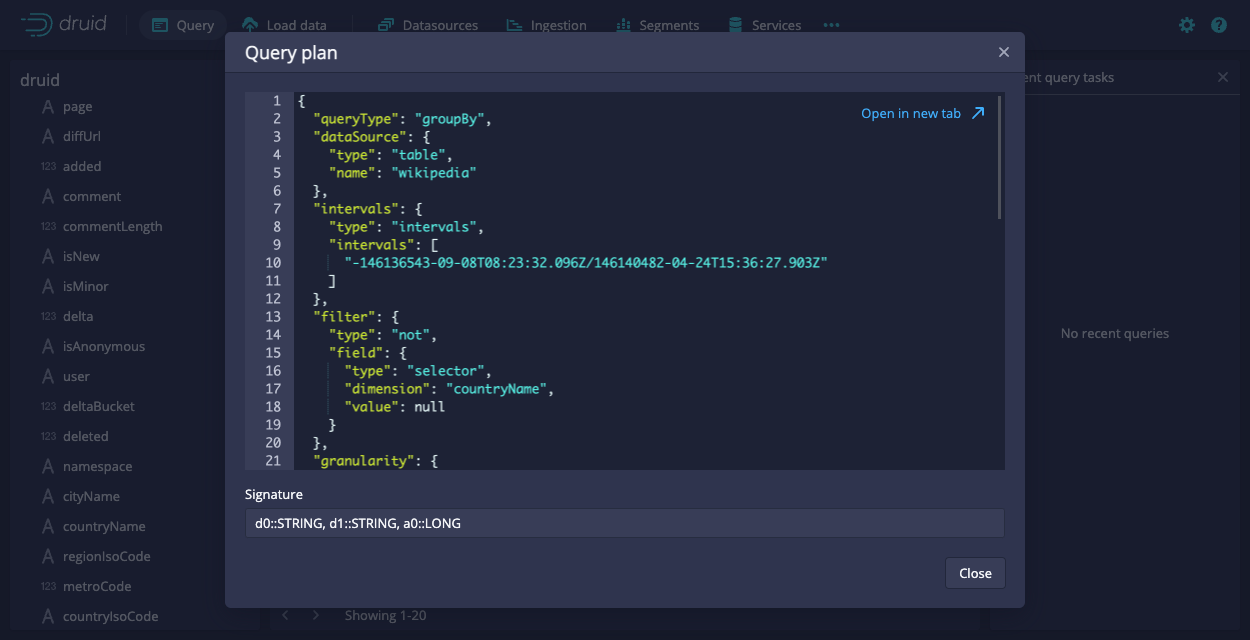
    Explain query

    Another way to view the explain plan is by adding EXPLAIN PLAN FOR to the front of your query, as follows:

    EXPLAIN PLAN FOR
    SELECT
     "page",
     "countryName",
     COUNT(*) AS "Edits"
    FROM "wikipedia"
    WHERE "countryName" IS NOT NULL
    GROUP BY 1, 2
    ORDER BY "Edits" DESC
    

    This is particularly useful when running queries from the command line or over HTTP.

  1. Finally, click ... and Edit context to see how you can add additional parameters controlling the execution of the query execution. In the field, enter query context options as JSON key-value pairs, as described in Context flags.

That's it! We've built a simple query using some of the query builder features built into the web console. The following sections provide a few more example queries you can try.

See Query SQL over HTTP for an example of how to use the Druid SQL HTTP API.

More Druid SQL examples

Try the following queries to learn a few more Druid SQL tricks:

Query over time

SELECT FLOOR(__time to HOUR) AS HourTime, SUM(deleted) AS LinesDeleted
FROM wikipedia WHERE TIME_IN_INTERVAL("__time", '2016-06-27/2016-06-28')
GROUP BY 1
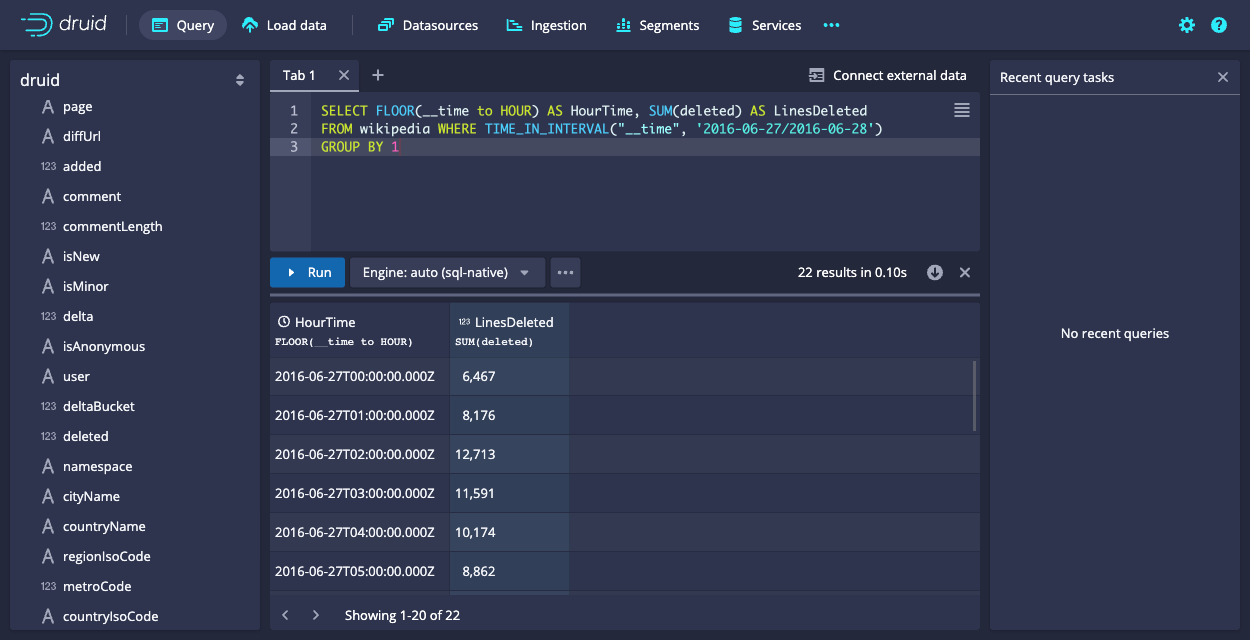
Query example

General group by

SELECT channel, page, SUM(added)
FROM wikipedia WHERE TIME_IN_INTERVAL("__time", '2016-06-27/2016-06-28')
GROUP BY channel, page
ORDER BY SUM(added) DESC
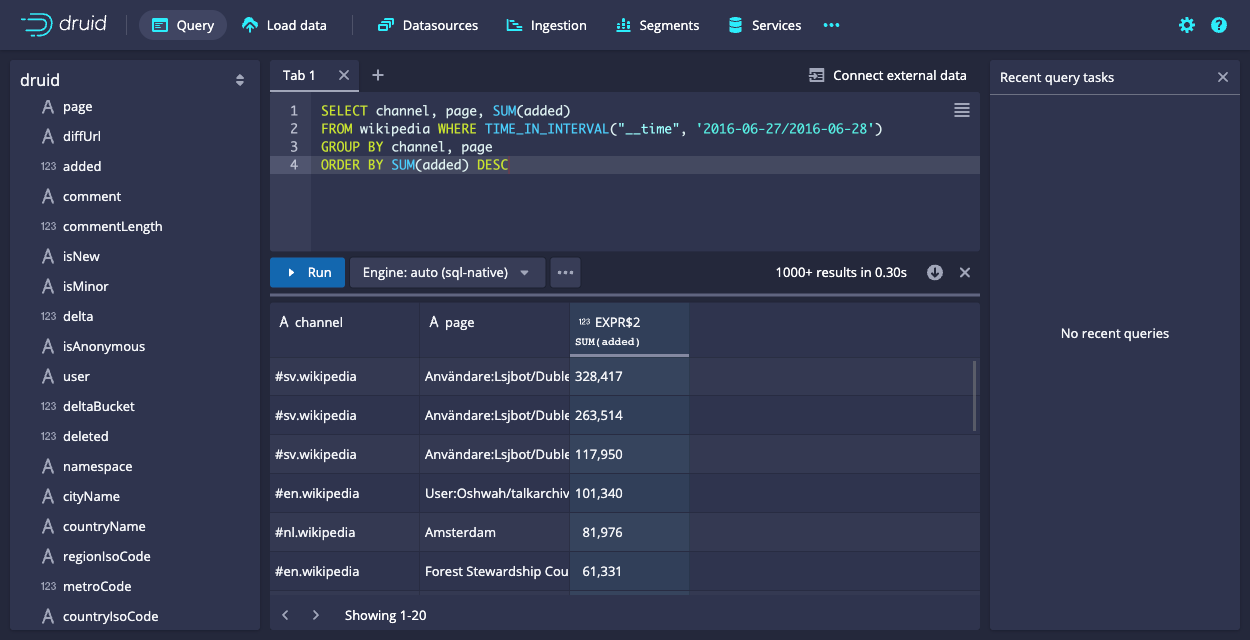
Query example

Query SQL over HTTP

You can submit native queries directly to the Druid Broker over HTTP. The request body should be a JSON object, with the value for the key query containing text of the query:

{
  "query": "SELECT page, COUNT(*) AS Edits FROM wikipedia WHERE TIME_IN_INTERVAL(\"__time\", '2016-06-27/2016-06-28') GROUP BY page ORDER BY Edits DESC LIMIT 10"
}

The tutorial package includes an example file that contains the SQL query shown above at quickstart/tutorial/wikipedia-top-pages-sql.json. Let's submit that query to the Druid Broker:

curl -X 'POST' -H 'Content-Type:application/json' -d @quickstart/tutorial/wikipedia-top-pages-sql.json http://localhost:8888/druid/v2/sql

The following results should be returned:

[
    {
        "page": "Copa América Centenario",
        "Edits": 29
    },
    {
        "page": "User:Cyde/List of candidates for speedy deletion/Subpage",
        "Edits": 16
    },
    {
        "page": "Wikipedia:Administrators' noticeboard/Incidents",
        "Edits": 16
    },
    {
        "page": "2016 Wimbledon Championships – Men's Singles",
        "Edits": 15
    },
    {
        "page": "Wikipedia:Administrator intervention against vandalism",
        "Edits": 15
    },
    {
        "page": "Wikipedia:Vandalismusmeldung",
        "Edits": 15
    },
    {
        "page": "The Winds of Winter (Game of Thrones)",
        "Edits": 12
    },
    {
        "page": "ولاية الجزائر",
        "Edits": 12
    },
    {
        "page": "Copa América",
        "Edits": 10
    },
    {
        "page": "Lionel Messi",
        "Edits": 10
    }
]

Further reading

See the Druid SQL documentation for more information on using Druid SQL queries.

See the Queries documentation for more information on Druid native queries.

← Load from Apache HadoopAggregate data with rollup →
  • Query SQL from the web console
  • More Druid SQL examples
    • Query over time
    • General group by
  • Query SQL over HTTP
  • Further reading

Technology · Use Cases · Powered by Druid · Docs · Community · Download · FAQ

 ·  ·  · 
Copyright © 2022 Apache Software Foundation.
Except where otherwise noted, licensed under CC BY-SA 4.0.
Apache Druid, Druid, and the Druid logo are either registered trademarks or trademarks of The Apache Software Foundation in the United States and other countries.