
Tutorial: Query from deep storage
Query from deep storage is an experimental feature.
Query from deep storage allows you to query segments that are stored only in deep storage, which provides lower costs than if you were to load everything onto Historical processes. The tradeoff is that queries from deep storage may take longer to complete.
This tutorial walks you through loading example data, configuring load rules so that not all the segments get loaded onto Historical processes, and querying data from deep storage.
To run the queries in this tutorial, replace ROUTER:PORT with the location of the Router process and its port number. For example, use localhost:8888 for the quickstart deployment.
For more general information, see Query from deep storage.
Load example data
Use the Load data wizard or the following SQL query to ingest the wikipedia sample datasource bundled with Druid. If you use the wizard, make sure you change the partitioning to be by hour.
Partitioning by hour provides more segment granularity, so you can selectively load segments onto Historicals or keep them in deep storage.
Show the query
REPLACE INTO "wikipedia" OVERWRITE ALL
WITH "ext" AS (SELECT *
FROM TABLE(
  EXTERN(
    '{"type":"http","uris":["https://druid.apache.org/data/wikipedia.json.gz"]}',
    '{"type":"json"}'
  )
) EXTEND ("isRobot" VARCHAR, "channel" VARCHAR, "timestamp" VARCHAR, "flags" VARCHAR, "isUnpatrolled" VARCHAR, "page" VARCHAR, "diffUrl" VARCHAR, "added" BIGINT, "comment" VARCHAR, "commentLength" BIGINT, "isNew" VARCHAR, "isMinor" VARCHAR, "delta" BIGINT, "isAnonymous" VARCHAR, "user" VARCHAR, "deltaBucket" BIGINT, "deleted" BIGINT, "namespace" VARCHAR, "cityName" VARCHAR, "countryName" VARCHAR, "regionIsoCode" VARCHAR, "metroCode" BIGINT, "countryIsoCode" VARCHAR, "regionName" VARCHAR))
SELECT
  TIME_PARSE("timestamp") AS "__time",
  "isRobot",
  "channel",
  "flags",
  "isUnpatrolled",
  "page",
  "diffUrl",
  "added",
  "comment",
  "commentLength",
  "isNew",
  "isMinor",
  "delta",
  "isAnonymous",
  "user",
  "deltaBucket",
  "deleted",
  "namespace",
  "cityName",
  "countryName",
  "regionIsoCode",
  "metroCode",
  "countryIsoCode",
  "regionName"
FROM "ext"
PARTITIONED BY HOUR
Configure a load rule
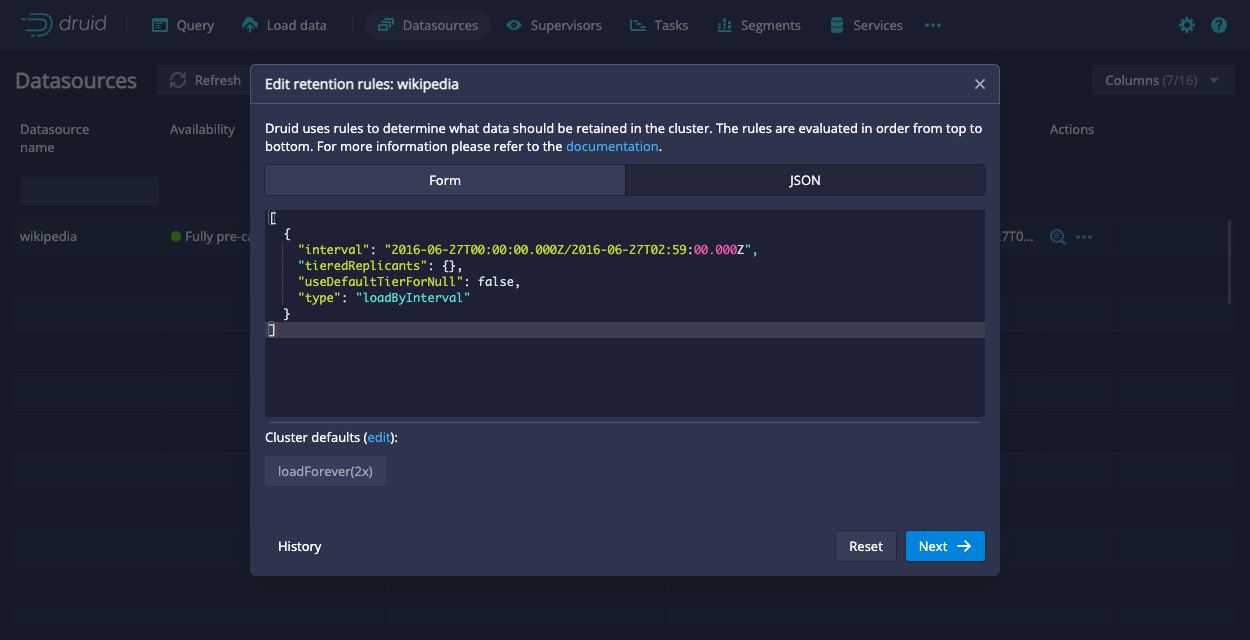
The load rule configures Druid to keep any segments that fall within the following interval only in deep storage:
2016-06-27T00:00:00.000Z/2016-06-27T02:59:00.000Z
The JSON form of the rule is as follows:
[
  {
    "interval": "2016-06-27T00:00:00.000Z/2016-06-27T02:59:00.000Z",
    "tieredReplicants": {},
    "useDefaultTierForNull": false,
    "type": "loadByInterval"
  }
]
The rest of the segments use the default load rules for the cluster. For the quickstart, that means all the other segments get loaded onto Historical processes.
You can configure the load rules through the API or the Druid console. To configure the load rules through the Druid console, go to Datasources > ... in the Actions column > Edit retention rules. Then, paste the provided JSON into the JSON tab:
Verify the replication factor
Segments that are only available from deep storage have a replication_factor of 0 in the Druid system table. You can verify that your load rule worked as intended using the following query:
SELECT "segment_id", "replication_factor", "num_replicas" FROM sys."segments" WHERE datasource = 'wikipedia'
You can also verify it through the Druid console by checking the Replication factor column in the Segments view.
Note that the number of replicas and replication factor may differ temporarily as Druid processes your retention rules.
Query from deep storage
Now that there are segments that are only available from deep storage, run the following query:
SELECT page FROM wikipedia WHERE __time < TIMESTAMP'2016-06-27 00:10:00' LIMIT 10
With the context parameter:
"executionMode": "ASYNC"
For example, run the following curl command:
curl --location 'http://localhost:8888/druid/v2/sql/statements' \
--header 'Content-Type: application/json' \
--data '{
    "query":"SELECT page FROM wikipedia WHERE __time <  TIMESTAMP'\''2016-06-27 00:10:00'\'' LIMIT 10",
    "context":{
        "executionMode":"ASYNC"
    }
}'
This query looks for records with timestamps that precede 00:10:00. Based on the load rule you configured earlier, this data is only available from deep storage.
When you submit the query from deep storage through the API, you get the following response:
Show the response
{
    "queryId": "query-6888b6f6-e597-456c-9004-222b05b97051",
    "state": "ACCEPTED",
    "createdAt": "2023-07-28T21:59:02.334Z",
    "schema": [
        {
            "name": "page",
            "type": "VARCHAR",
            "nativeType": "STRING"
        }
    ],
    "durationMs": -1
}
Make sure you note the queryID. You'll need it to interact with the query.
Compare this to if you were to submit the query to Druid SQL's regular endpoint, POST /sql:
curl --location 'http://localhost:8888/druid/v2/sql/' \
--header 'Content-Type: application/json' \
--data '{
    "query":"SELECT page FROM wikipedia WHERE __time <  TIMESTAMP'\''2016-06-27 00:10:00'\'' LIMIT 10",
    "context":{
        "executionMode":"ASYNC"
    }
}'
The response you get back is an empty response cause there are no records on the Historicals that match the query.
Get query status
Replace :queryId with the ID for your query and run the following curl command to get your query status:
curl --location --request GET 'http://localhost:8888/druid/v2/sql/statements/:queryId' \
--header 'Content-Type: application/json' \
Response for a running query
The response for a running query is the same as the response from when you submitted the query except the state is RUNNING instead of ACCEPTED.
Response for a completed query
A successful query also returns a pages object that includes the page numbers (id), rows per page (numRows), and the size of the page (sizeInBytes). You can pass the page number as a parameter when you get results to refine the results you get.
Note that sampleRecords has been truncated for brevity.
Show the response
{
    "queryId": "query-6888b6f6-e597-456c-9004-222b05b97051",
    "state": "SUCCESS",
    "createdAt": "2023-07-28T21:59:02.334Z",
    "schema": [
        {
            "name": "page",
            "type": "VARCHAR",
            "nativeType": "STRING"
        }
    ],
    "durationMs": 87351,
    "result": {
        "numTotalRows": 152,
        "totalSizeInBytes": 9036,
        "dataSource": "__query_select",
        "sampleRecords": [
            [
                "Salo Toraut"
            ],
            [
                "利用者:ワーナー成増/放送ウーマン賞"
            ],
            [
                "Bailando 2015"
            ],
            ...
            ...
            ...
        ],
        "pages": [
            {
                "id": 0,
                "numRows": 152,
                "sizeInBytes": 9036
            }
        ]
    }
}
Get query results
Replace :queryId with the ID for your query and run the following curl command to get your query results:
curl --location 'http://ROUTER:PORT/druid/v2/sql/statements/:queryId'
Note that the response has been truncated for brevity.
Show the response
[
    {
        "page": "Salo Toraut"
    },
    {
        "page": "利用者:ワーナー成増/放送ウーマン賞"
    },
    {
        "page": "Bailando 2015"
    },
    ...
    ...
    ...
]