
Tutorial: Deleting data
This tutorial demonstrates how to delete existing data.
This tutorial requires the following:
- A running Apache Druid instance. If you don't have Druid, see the single-machine quickstart to get started.
- The command-line JSON processor, jq.
Load initial data
In this tutorial, we will use the Wikipedia edits data, with an indexing spec that creates hourly segments. This spec is located at quickstart/tutorial/deletion-index.json, and it creates a datasource called deletion-tutorial.
Let's load this initial data:
bin/post-index-task --file quickstart/tutorial/deletion-index.json --url http://localhost:8081
When the load finishes, open http://localhost:8888/unified-console.md#datasources in a browser.
How to permanently delete data
Permanent deletion of a Druid segment has two steps:
- The segment must first be marked as "unused". This occurs when a user manually disables a segment through the Coordinator API.
- After segments have been marked as "unused", a Kill Task will delete any "unused" segments from Druid's metadata store as well as deep storage.
Let's drop some segments now, by using the coordinator API to drop data by interval and segmentIds.
Disable segments by interval
Let's disable segments in a specified interval. This will mark all segments in the interval as "unused", but not remove them from deep storage.
Let's disable segments in interval 2015-09-12T18:00:00.000Z/2015-09-12T20:00:00.000Z i.e. between hour 18 and 20.
curl -X 'POST' -H 'Content-Type:application/json' -d '{ "interval" : "2015-09-12T18:00:00.000Z/2015-09-12T20:00:00.000Z" }' http://localhost:8081/druid/coordinator/v1/datasources/deletion-tutorial/markUnused
When the request completes, the Segments view of the web console no longer displays the segments for hours 18 and 19.
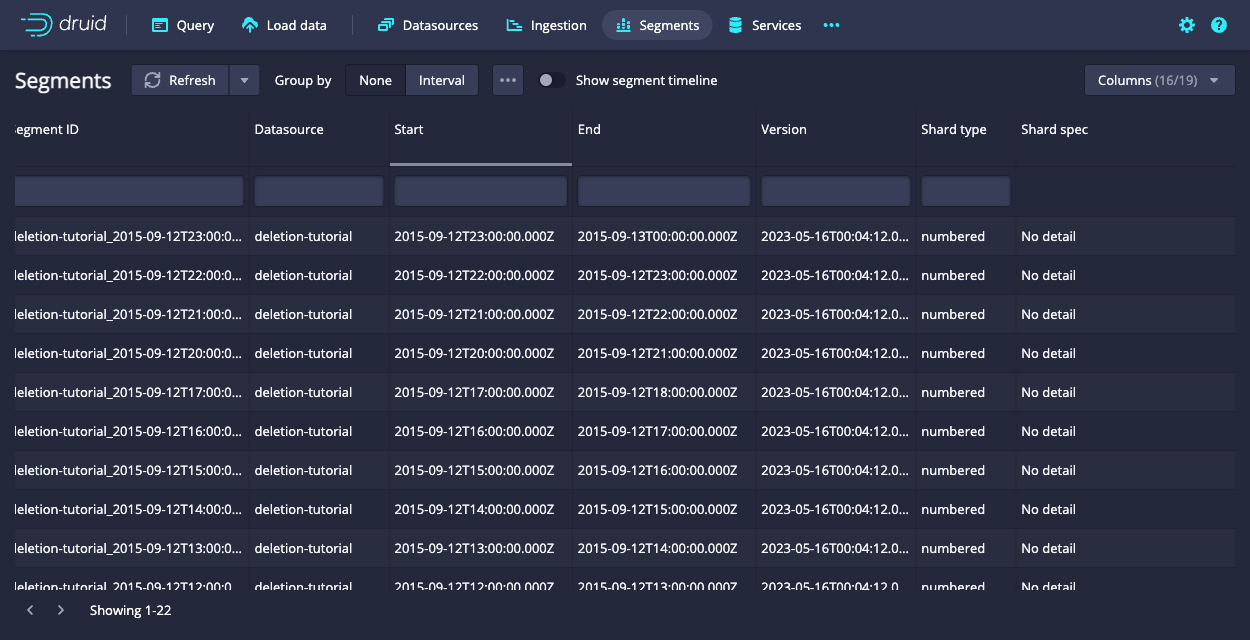
Note that the hour 18 and 19 segments are still present in deep storage:
$ ls -l1 var/druid/segments/deletion-tutorial/
2015-09-12T00:00:00.000Z_2015-09-12T01:00:00.000Z
2015-09-12T01:00:00.000Z_2015-09-12T02:00:00.000Z
2015-09-12T02:00:00.000Z_2015-09-12T03:00:00.000Z
2015-09-12T03:00:00.000Z_2015-09-12T04:00:00.000Z
2015-09-12T04:00:00.000Z_2015-09-12T05:00:00.000Z
2015-09-12T05:00:00.000Z_2015-09-12T06:00:00.000Z
2015-09-12T06:00:00.000Z_2015-09-12T07:00:00.000Z
2015-09-12T07:00:00.000Z_2015-09-12T08:00:00.000Z
2015-09-12T08:00:00.000Z_2015-09-12T09:00:00.000Z
2015-09-12T09:00:00.000Z_2015-09-12T10:00:00.000Z
2015-09-12T10:00:00.000Z_2015-09-12T11:00:00.000Z
2015-09-12T11:00:00.000Z_2015-09-12T12:00:00.000Z
2015-09-12T12:00:00.000Z_2015-09-12T13:00:00.000Z
2015-09-12T13:00:00.000Z_2015-09-12T14:00:00.000Z
2015-09-12T14:00:00.000Z_2015-09-12T15:00:00.000Z
2015-09-12T15:00:00.000Z_2015-09-12T16:00:00.000Z
2015-09-12T16:00:00.000Z_2015-09-12T17:00:00.000Z
2015-09-12T17:00:00.000Z_2015-09-12T18:00:00.000Z
2015-09-12T18:00:00.000Z_2015-09-12T19:00:00.000Z
2015-09-12T19:00:00.000Z_2015-09-12T20:00:00.000Z
2015-09-12T20:00:00.000Z_2015-09-12T21:00:00.000Z
2015-09-12T21:00:00.000Z_2015-09-12T22:00:00.000Z
2015-09-12T22:00:00.000Z_2015-09-12T23:00:00.000Z
2015-09-12T23:00:00.000Z_2015-09-13T00:00:00.000Z
Disable segments by segment IDs
Let's disable some segments by their segmentID. This will again mark the segments as "unused", but not remove them from deep storage. You can see the full segmentID for a segment using the web console.
In the segments view, click one of the segment rows to open the segment metadata dialog:
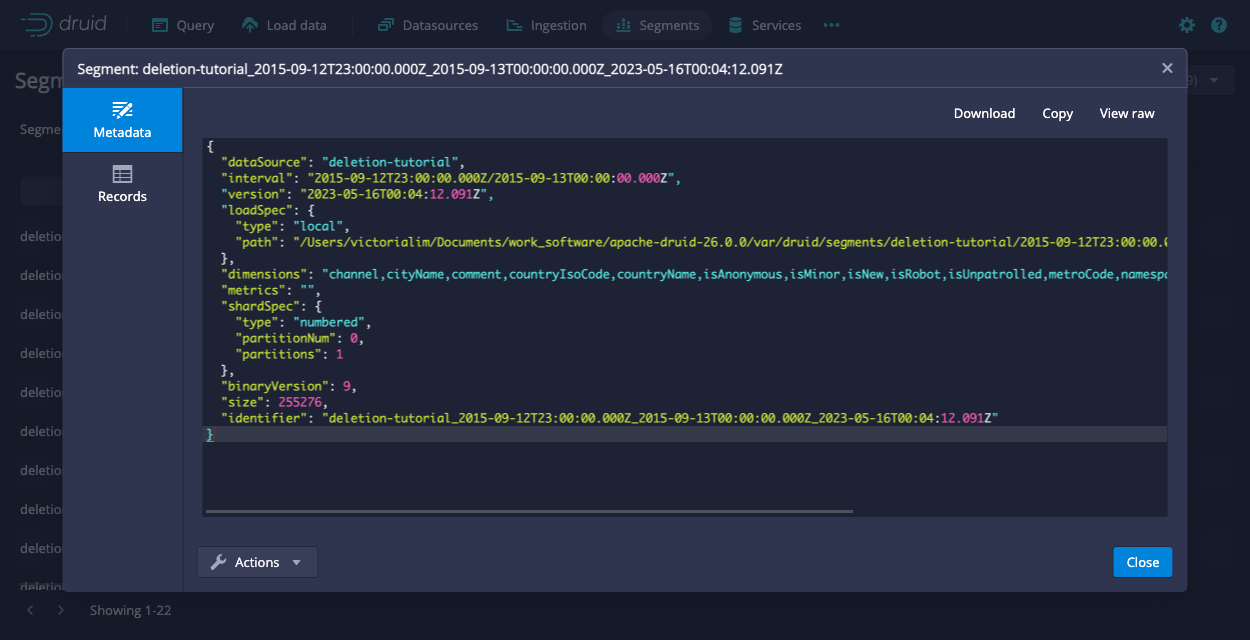
The identifier field in the metadata dialog shows the full segment ID. For example, the hour 23 segment has segment ID deletion-tutorial_2015-09-12T23:00:00.000Z_2015-09-13T00:00:00.000Z_2023-05-16T00:04:12.091Z.
Disable the last two segments, hour 22 and 23 segments, by sending a POST request to the Coordinator with the corresponding segment IDs.
The following command queries the Coordinator for segment IDs and uses jq to parse and extract the IDs of the last two segments.
The segment IDs are stored in an environment variable named unusedSegmentIds.
unusedSegmentIds=$(curl -X 'GET' -H 'Content-Type:application/json' http://localhost:8081/druid/coordinator/v1/datasources/deletion-tutorial/segments | jq '.[-2:]')
The following request marks the segments unused:
curl -X 'POST' -H 'Content-Type:application/json' -d "{\"segmentIds\": $unusedSegmentIds}" http://localhost:8081/druid/coordinator/v1/datasources/deletion-tutorial/markUnused
When the request completes, the Segments view of the web console no longer displays the segments for hours 22 and 23.
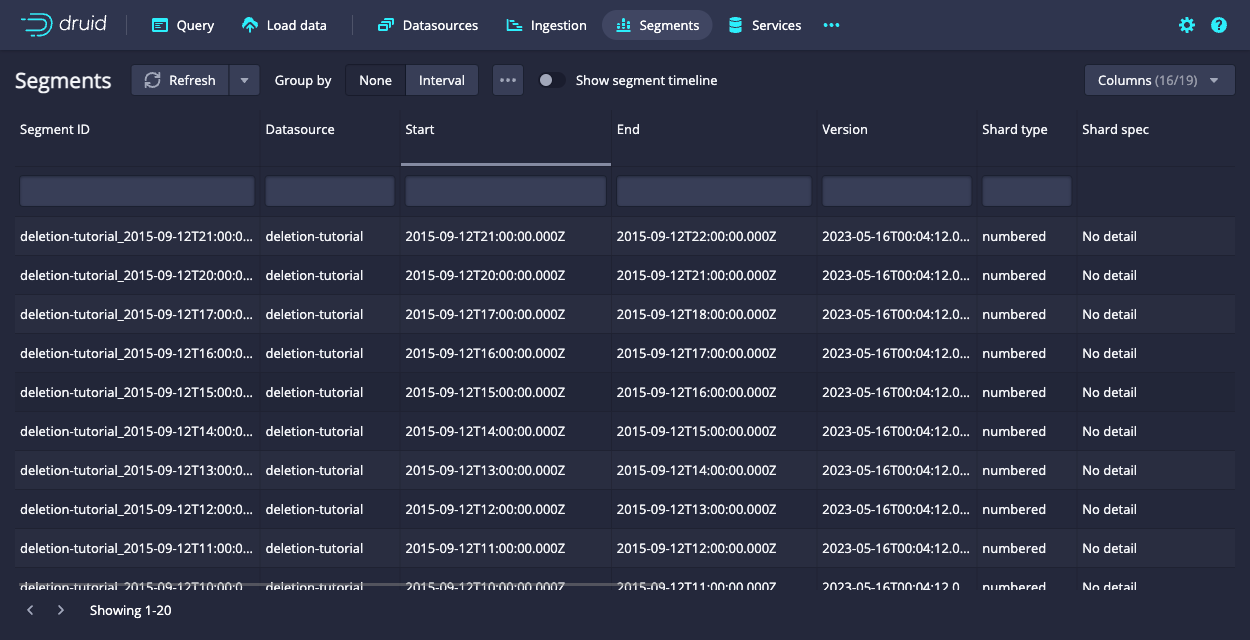
Note that the hour 22 and 23 segments are still in deep storage:
$ ls -l1 var/druid/segments/deletion-tutorial/
2015-09-12T00:00:00.000Z_2015-09-12T01:00:00.000Z
2015-09-12T01:00:00.000Z_2015-09-12T02:00:00.000Z
2015-09-12T02:00:00.000Z_2015-09-12T03:00:00.000Z
2015-09-12T03:00:00.000Z_2015-09-12T04:00:00.000Z
2015-09-12T04:00:00.000Z_2015-09-12T05:00:00.000Z
2015-09-12T05:00:00.000Z_2015-09-12T06:00:00.000Z
2015-09-12T06:00:00.000Z_2015-09-12T07:00:00.000Z
2015-09-12T07:00:00.000Z_2015-09-12T08:00:00.000Z
2015-09-12T08:00:00.000Z_2015-09-12T09:00:00.000Z
2015-09-12T09:00:00.000Z_2015-09-12T10:00:00.000Z
2015-09-12T10:00:00.000Z_2015-09-12T11:00:00.000Z
2015-09-12T11:00:00.000Z_2015-09-12T12:00:00.000Z
2015-09-12T12:00:00.000Z_2015-09-12T13:00:00.000Z
2015-09-12T13:00:00.000Z_2015-09-12T14:00:00.000Z
2015-09-12T14:00:00.000Z_2015-09-12T15:00:00.000Z
2015-09-12T15:00:00.000Z_2015-09-12T16:00:00.000Z
2015-09-12T16:00:00.000Z_2015-09-12T17:00:00.000Z
2015-09-12T17:00:00.000Z_2015-09-12T18:00:00.000Z
2015-09-12T18:00:00.000Z_2015-09-12T19:00:00.000Z
2015-09-12T19:00:00.000Z_2015-09-12T20:00:00.000Z
2015-09-12T20:00:00.000Z_2015-09-12T21:00:00.000Z
2015-09-12T21:00:00.000Z_2015-09-12T22:00:00.000Z
2015-09-12T22:00:00.000Z_2015-09-12T23:00:00.000Z
2015-09-12T23:00:00.000Z_2015-09-13T00:00:00.000Z
Run a kill task
Now that we have disabled some segments, we can submit a Kill Task, which will delete the disabled segments from metadata and deep storage.
A Kill Task spec has been provided at quickstart/tutorial/deletion-kill.json. Submit this task to the Overlord with the following command:
curl -X 'POST' -H 'Content-Type:application/json' -d @quickstart/tutorial/deletion-kill.json http://localhost:8081/druid/indexer/v1/task
When the task finishes, note that Druid deleted the disabled segments from deep storage.
$ ls -l1 var/druid/segments/deletion-tutorial/
2015-09-12T00:00:00.000Z_2015-09-12T01:00:00.000Z
2015-09-12T01:00:00.000Z_2015-09-12T02:00:00.000Z
2015-09-12T02:00:00.000Z_2015-09-12T03:00:00.000Z
2015-09-12T03:00:00.000Z_2015-09-12T04:00:00.000Z
2015-09-12T04:00:00.000Z_2015-09-12T05:00:00.000Z
2015-09-12T05:00:00.000Z_2015-09-12T06:00:00.000Z
2015-09-12T06:00:00.000Z_2015-09-12T07:00:00.000Z
2015-09-12T07:00:00.000Z_2015-09-12T08:00:00.000Z
2015-09-12T08:00:00.000Z_2015-09-12T09:00:00.000Z
2015-09-12T09:00:00.000Z_2015-09-12T10:00:00.000Z
2015-09-12T10:00:00.000Z_2015-09-12T11:00:00.000Z
2015-09-12T11:00:00.000Z_2015-09-12T12:00:00.000Z
2015-09-12T12:00:00.000Z_2015-09-12T13:00:00.000Z
2015-09-12T13:00:00.000Z_2015-09-12T14:00:00.000Z
2015-09-12T14:00:00.000Z_2015-09-12T15:00:00.000Z
2015-09-12T15:00:00.000Z_2015-09-12T16:00:00.000Z
2015-09-12T16:00:00.000Z_2015-09-12T17:00:00.000Z
2015-09-12T17:00:00.000Z_2015-09-12T18:00:00.000Z
2015-09-12T20:00:00.000Z_2015-09-12T21:00:00.000Z
2015-09-12T21:00:00.000Z_2015-09-12T22:00:00.000Z